Chat Module
The ChatModule is a module containing several features and functionality. It is based on the HogWarpChat.
Feature Overview
- Single Actor for sending messages to players ✅
- Full control with builder pattern for complex chat messages ✅
- Simple command registration with Attribute ✅
- Offers different channels (House, Global, ...) ✅
- Chat message commit history (using
up/downarrow) ✅ - Player-specific settings ✅
Sending a Message
Sending a message to a single player is as easy as
- Injecting the ChatActor as a depedency
- Determinig the target player
- Calling
SendMessagein ChatActor with the target and provided content of the ChatActor
[RegisterSingleton]
public class MyController(PlayerController _playerController, ChatActor _chatActor) {

	public async Task Something()
	{
		// Determining the player
		var player = _playerController...
		_chatActor.SendMessage(player, "Hello from MyController!");
	}
}
Building Complex Message
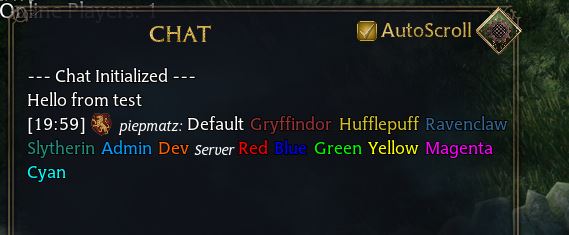
The chat allows for icons to be displayed and styles to be applied for texts using <> tags. For easier usage, the ChatMessage.Builder is introduced, so you can build a complex message with many colors as easy as that:
var builder = new ChatMessage.Builder();
builder.AddIcon(ChatIcon.Gryffindor);
builder.AddText("Default ", ChatTextStyle.Default);
builder.AddText("Gryffindor ", ChatTextStyle.Gryffindor);
builder.AddText("Hufflepuff ", ChatTextStyle.Hufflepuff);
builder.AddText("Ravenclaw ", ChatTextStyle.Ravenclaw);
builder.AddText("Slytherin ", ChatTextStyle.Slytherin);
builder.AddText("Admin ", ChatTextStyle.Admin);
builder.AddText("Dev ", ChatTextStyle.Dev);
builder.AddText("Server ", ChatTextStyle.Server);
builder.AddText("Red ", ChatTextStyle.Red);
builder.AddText("Blue ", ChatTextStyle.Blue);
builder.AddText("Green ", ChatTextStyle.Green);
builder.AddText("Yellow ", ChatTextStyle.Yellow);
builder.AddText("Magenta ", ChatTextStyle.Magenta);
builder.AddText("Cyan ", ChatTextStyle.Cyan);
builder.AddSender(player.Username, ChatTextStyle.Server);
_chatActor.SendMessage(player, builder.Build().Message);
Resulting in the output shown in the image in the top.
Command Registration
A chat command can be registered using the SlashCommandAttribute . Optional args can be used, that are based on the player input, splitted along whitespaces ' ' without the command.
The first argument of the method must be the PiPlayer .
The second argument is optional.
Note
The server will not start if an invalid attribute usage was detected
[RegisterSingleton]
public class MyController(ChatActor _chatActor) {

	[SlashCommand("example")]
	public async Task ExampleWithoutArguments(PiPlayer player)
	{
		_chatActor.SendMessage(player, $"You called the example without arguments");
	}

	[SlashCommand("exampleargs")]
	public async Task ExampleWithArguments(PiPlayer player, string[] args)
	{
		_chatActor.SendMessage(player, $"You called the example with a total of {args.Length} arguments");
	}
}
Channels
By default, Pillars offers two channels:
- House
- Global
Switching channels can be done via the /house or /global command.
There will be improvements to chat in regards to that later 😊.
Settings
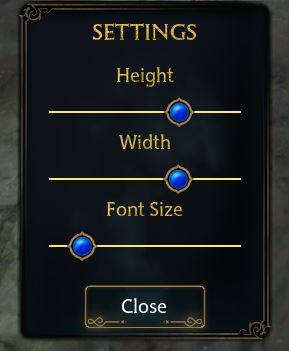
Each player can specify their own settings of the chat, e.g.
- Width
- Height
- FontSize (TextScale)
These settings are saved when the settings window gets closed. These settings are saved in the database using the ChatSettings entity.
Improvements / TODOs
A list of improvements / todos for the chat :
- Add some more settings
- Show background:
- Always
- Never
- Only when active
- Sound Effects On / Off
- Show background:
- Channels
- Make channels dynamically (provided by server)
- Possibility to talk to channel usinig a designated prefix
- Whisper
- Add whisper functionality with
@username
- Add whisper functionality with
- Blocklist
- Possibility to have a blocklist for whispers
- Possibility to have a generic blocklist
- Bind blocklist to account
- Command Auto-Complete
- When player starts typing with
/, offer a list of possible commands to possibly select from
- When player starts typing with