Creating Your First Module
Pillars already provides some core and non-core modules out of the box. The following guide will show you, how to implement some functionality into the server. This guide assumes that you have completed the Getting Started guide and your HogWarp server is up and running without any errors.
This guide will teach you:
- Work with Dependency Injection and Pillars
- How to extend some of the core entities
- Create your own entity
- Hook into core events
- Call other modules
What this guide will not teach you:
- How to embed / integrate client mods into Pillars
- How to be a better person
The Plan
First we'll make a plan, what our module should do. For this guide our module will:
- Log every connect / disconnect of a player / account in the database
- Attach the "LastLogin" of a player to its account
- Attach a "PlayTime" field to the account and automatically update that
- Add a chat command
/playedto show that playtime to the player in the chat
Let's call this module LoginObserver
Step 1 - Creating Structure / Folders
First we'll create a folder structure, even though some of the folders will only contain a single file, lets stick to the coding guidelines:
Server/
│
├── Core/
│   └── ...
│
├── LoginObserver/
│   ├── Controllers/
│   ├── Entities/
│   └── Services/
│
└── ...
Step 2 - Entity
LoginLog
Now we'll create our first entity, the LoginLog, in which we make use of the ICreatedOn auto-managed property as the login DateTime and add an additional field for the logout DateTime. We use the One-To-One behavior to be able to refer the entities to each other.
Server/LoginObserver/Entities/LoginLog.cs:
namespace Pillars.Entities;

[Collection("loginLogs")]
public sealed class LoginLog : Entity, ICreatedOn
{
	/// <summary>
	/// The account that refers to this log entry, as a reference
	/// </summary>
	public required One<Account> Account { get; set; }

	/// <summary>
	/// A new log will be created on each login, so this is the login time
	/// </summary>
	public DateTime CreatedOn { get; set; }

	/// <summary>
	/// DateTime when the account is logged out / player disconnected
	/// </summary>
	public DateTime? LoggedOutOn { get; set; }
}
You could also add fields like IP etc. to it, if you or HogWarp can provide them.
Account Reference
Now we'll create a reference between the LoginLog and the Account for easier retrieval. Additional we will add a PlayTime field. You could create two seperate files, if you wanted to.
Server/LoginObserver/Entities/Account.LoginLog.cs:
namespace Pillars.Entities;

public sealed partial class Account
{
	/// <summary>
	/// Log, the last time account logged in / out, as a reference
	/// </summary>
	public One<LoginLog>? LastLogin { get; set; }

	/// <summary>
	/// The playtime of that account in seconds
	/// </summary>
	public ulong PlayTime { get; set; }
}
Step 3 - Creating the Service
Based on our coding guidelines, services are responsible for simple CRUD operations to database, file, w/e (simple I/O). So we'll create a service in our module, that:
- shall create a new
LoginLogfor a given account - attach the created log as a reference to the account
- return the added entry
Server/LoginObserver/Services/LoginObserverService.cs:
namespace Pillars.LoginObserver.Services;

[RegisterSingleton]
public sealed class LoginObserverService(ILogger l)
{
	private readonly ILogger _logger = l.ForThisContext();

	#region CREATE

	/// <summary>
	/// Creates a new login log entry for the given account.
	/// The created log will be added as a reference to the account as "LastLogin"
	/// </summary>
	public async Task<LoginLog?> CreateLoginLogAsync(Account acc)
	{
		try
		{
			LoginLog loginLog = new() { Account = acc.ToReference() };
			await loginLog.SaveAsync();
			// We embed the lastlogin for easier logout save
			acc.LastLogin = loginLog.ToReference();
			await acc.SaveOnlyAsync(a => new { a.LastLogin });
			return loginLog;
		}
		catch (Exception ex)
		{
			_logger.Error(ex);
			return null;
		}
	}

	#endregion
}
As you can see, the account is added as a reference (else we will save the entire entity), and the same applies for the log entry.
The SaveOnlyAsync ensures, that only the LastLogin field is updated. When working with partial entities, you may only update the fields you are responsible for.
Step 4 - Creating the Controller
Player Connect
Our controller is the main "logic" here. We simply create a controller that hooks into the OnPlayerConnected event from PlayerConnectionEvents and initiates a log entry.
Server/LoginObserver/Controllers/LoginObserverController.cs:
namespace Pillars.LoginObserver.Controllers;

using Services;

[RegisterSingleton]
public sealed class LoginObserverController
{
	private readonly ILogger _logger;
	private readonly LoginObserverService _loginObserverService;

	public LoginObserverController(ILogger l, PlayerConnectionEvents pce, LoginObserverService los)
	{
		_logger = l.ForThisContext();
		_loginObserverService = los;
		pce.OnPlayerConnected += PlayerConnected;
	}

	/// <summary>
	/// If a player gets connected, we create a login log
	/// and print a message.
	/// </summary>
	private async Task PlayerConnected(PiPlayer player)
	{
		try
		{
			_logger.Information("Player #{pid} connected with: Account - {aid} , DiscordId - {did}",
				player.Id, player.Account.ID, PlayerHelper.GetDiscordId(player.Player));
			var log = await _loginObserverService.CreateLoginLogAsync(player.Account);
			if (log is null)
				_logger.Error("Failed to create login log for player #{pid}", player.Id);
		}
		catch (Exception ex)
		{
			_logger.Error(ex);
		}
	}
}
Tip
It is recommended to extend or track your own GlobalUsings to avoid having "usings" in your file.
If we now connect and have the database logs enabled - see Configuration - we should see something like this:
[11:26:17] [Information] [LoginObserver] Player #0 connected with: Account - 67b9ee3bb61e814e669d6a1d , DiscordId - 137931603681738752
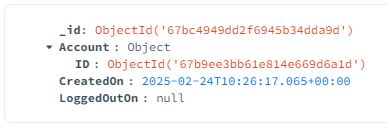
[11:26:17] [Debug] [DatabaseController] { "insert" : "loginLogs", "ordered" : true, "$db" : "hogwarp", "lsid" : { "id" : { "$binary" : { "base64" : "MaSbenOtQVmKfpB36G40Rg==", "subType" : "04" } } }, "documents" : [{ "_id" : { "$oid" : "67bc4949dd2f6945b34dda9d" }, "Account" : { "ID" : { "$oid" : "67b9ee3bb61e814e669d6a1d" } }, "CreatedOn" : { "$date" : "2025-02-24T10:26:17.065Z" }, "LoggedOutOn" : null }] }
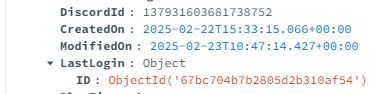
[11:26:17] [Debug] [DatabaseController] { "update" : "accounts", "ordered" : true, "$db" : "hogwarp", "lsid" : { "id" : { "$binary" : { "base64" : "MaSbenOtQVmKfpB36G40Rg==", "subType" : "04" } } }, "updates" : [{ "q" : { "_id" : { "$oid" : "67b9ee3bb61e814e669d6a1d" } }, "u" : { "$set" : { "LastLogin" : { "_id" : { "$oid" : "67bc4949dd2f6945b34dda9d" }, "Account" : { "ID" : { "$oid" : "67b9ee3bb61e814e669d6a1d" } }, "CreatedOn" : { "$date" : "2025-02-24T10:26:17.065Z" }, "LoggedOutOn" : null } } }, "upsert" : true }] }
You can now check your database via MongoDBCompass and see if the corresponding collection and account entry exists:
LoginLog:
Account:
Player Disconnect - LoggedOutOn
Now we also need to update the LoggedOutOn in the log.
Therefore we either add an additional method in our service and call it from the controller or due to laziness directly update the entity.
We will leave this part up to you as an exercise ;)
Player Disconnect - Playtime
Additionally we want to update the playtime of the account, when the player disconnects, so we hook into the OnPlayerDisconnected from PlayerConnectionEvents
Important
It is highly recommended to subscribe to the event multiple times for each implementation, meaning LoggedOutOn and PlayTime have their own subscription.
Controller:
public LoginObserverController(...)
{
	...
	pce.OnPlayerDisconnected += UpdateAccountPlaytime;
	...
}

/// <summary>
/// On player disconnect, we check the DateTime of the LastLogin attached
/// to the account and add the seconds to the playtime.
/// </summary>
private async Task UpdateAccountPlaytime(PiPlayer player)
{
	try
	{
		// Retrieve the last log entry based on ID, this should usually live in your service
		// with a function like `GetLastLogin(...)`
		LoginLog? lastLogin = player.Account.LastLogin?.ID is null
			? null
			: await DB.Find<LoginLog>()
				.MatchID(player.Account.LastLogin.ID)
				.ExecuteFirstAsync();

		if (lastLogin is null)
		{
			_logger.Warning(
				"Player #{pid} with AccountId {aid} has no login attached. Failed to calculate playtime!",
				player.Id, player.Account.ID);
			return;
		}

		// Calculate seconds based on unix time diff
		var secondsDiff = (ulong)((DateTimeHelper.ToUnixTimeMilliseconds(DateTime.UtcNow) -
									DateTimeHelper.ToUnixTimeMilliseconds(player.Account.LastLogin
										.CreatedOn)) / 1000);
		player.Account.PlayTime += secondsDiff;
		await player.Account.SaveOnlyAsync(a => new { a.PlayTime });
	}
	catch (Exception ex)
	{
		_logger.Error(ex);
	}
}
Note
The seconds difference calculation is based on unix time and some helper functions.
Step 5 - Problems
If you look into the implementation, you will notice, that if the server crashes, a LoginLog will exist on the account where no appropriate LoggedOutOn can be set.
You can now add a "Validation" upon server start, using the Controller Lifecycle in its InitializeAsync() step that sets the LoggedOutOn on each log entry, where the it is null.
public async Task ValidateLogsAsync()
{
	var result = await DB.Update<LoginLog>()
		.Match(ll => ll.LoggedOutOn == null)
		.Modify(ll => ll.LoggedOutOn, DateTime.UtcNow)
		.ExecuteAsync();
	if (result.ModifiedCount > 0)
		_logger.Warning("Updated a total of {count} invalid login logs", result.ModifiedCount);
}
Step 6 - Chat Command
To register a chat command, it is recommend that you give the Chat Module documentation a read, but it should be as easy as adding the following to your controller:
[SlashCommand("played")]
private async Task ShowPlaytime(PiPlayer player)
{
	var playtime = player.Account.PlayTime;
	var message = new ChatMessage.Builder(false)
		.AddText($"Your total playtime is: {DateTimeHelper.FormatDuration((int)playtime)}")
		.Build().Message;
	_chatActor.SendMessageToPlayer(player, message);
}
Step 7 - Further Improvements / Ideas
Now that you've got the hang of it, here is some ideas you can work upon:
- Add a "Banned" field to the account and kick a player on connect if the account is banned
- Add a "Bans" collection that contains banned discordIds and a possible reason. If a player connects with a banned discordId, kick the player
- Add a command like
/methat prints out info of the player and account - ...